Smart LED Screens: How IoT Integration Solves Real Business Problems
Published: 15 Jul 2025
The Coffee Shop That Saved $15k with LED Screen Integration with IoT
Maria’s cafe struggled with manual menu updates. Staff fumbled with USB drives daily, leading to errors and wasted time. After connecting her LED menu board to IoT sensors, prices auto-updated with inventory changes, and specials shifted with weather. Result: 30% less food waste and $15k yearly savings. If you face:
High operational costs
LED Screen Integration with IoT is your game-changer.
Time-consuming manual updates
Missed opportunities for real-time engagement
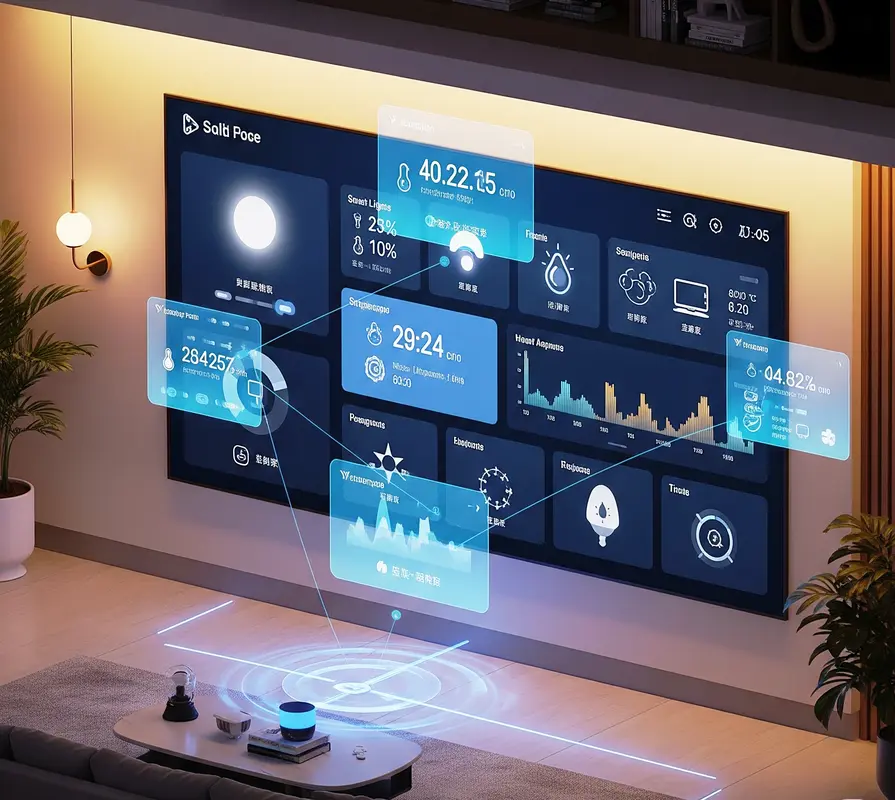
Simple explanation of LED Screen Integration with IoT in 3 lines with an easy example:
- Connect your LED screen to the internet (using a small computer like Raspberry Pi).
- Make it “smart” so it auto-updates based on real-world data (like weather, time, or sensors).
- Save time/money by removing manual work while making your display more engaging.
🌧️ Easy Example: Smart Bus Stop Ad
Problem: A coffee shop pays for ads on a bus stop screen, but wastes money showing iced drinks on rainy days.
IoT Solution:
- Connect the screen to a weather app via the internet.
- Set a rule: “If rain forecast → Show ads for HOT COFFEE”.
- On sunny days: Auto-switch to ICED LATTE ads.
Result:
✅ Ads always match the weather → More sales
✅ Zero staff time spent changing ads
✅ Screen uses 40% less power at night (auto-dimming)
No coding needed – tools like Yodeck or ScreenCloud handle this! 😊
Understanding LED Screen Integration with IoT
Turn static displays into intelligent systems.
IoT connects LED screens to networks, letting them receive data from sensors, apps, and online sources. This enables automatic content changes without human intervention. Think of it as giving your screens a brain that reacts to the environment.
What is IoT and Why Connect to LED Screens?
IoT (Internet of Things) means everyday objects sharing data via the internet. For LED screens, this allows:
- Real-time updates: Change messages instantly (e.g., pricing, promotions).
- Automation: Screens adjust based on triggers like time, weather, or inventory.
- Data-driven content: Show live social media feeds, scores, or traffic.
- Remote management: Control screens from anywhere via apps.
- Energy savings: Brightness auto-adjusts to ambient light.
- Interactive experiences: Screens respond to motion or touch.
- Predictive maintenance: Get alerts before failures occur.
- Integration: Sync with POS, CRM, or weather APIs.
- Scalability: Manage 1 or 100 screens from one dashboard.
- Audience targeting: Show content based on who’s viewing (e.g., via cameras).
Example: A bus stop display shows ads for umbrellas when rain is forecast.
Core Components of an LED Screen Integration with IoT
To Enabled LED System core components of an IoT are following
- LED Screen: Must support IoT controllers (e.g., Novastar, Brompton).
- IoT Controller: Small device attached to screen (like Raspberry Pi).
- Sensors: Motion, temperature, or occupancy detectors.
- Connectivity: Wi-Fi, 4G/5G, or Ethernet for data transfer.
- Software: Content management system (CMS) like ScreenCloud or Yodeck.
- APIs: Connect to external data (weather, stock, social media).
- Power Management: Smart plugs to cut idle power use.
- Security: Firewalls and VPNs to protect data.
- Analytics Dashboard: Track views, engagement, and errors.
- Backup Systems: Local storage for offline fallback.
Tip: Start with a $99 Raspberry Pi kit – no coding needed!
Top Applications and Benefits
Where IoT-LED combos shine brightest.
Smart Retail Experiences
- Dynamic Pricing: Shelf tags update via inventory sensors.
- Personalized Ads: Cameras detect demographics to show targeted ads.
- Queue Management: Display wait times linked to POS systems.
- Weather-Triggered Promotions: Push sunscreen ads on hot days.
- Inventory Alerts: Show “Low Stock” messages automatically.
- Interactive Catalogs: Touchscreens pull live product data.
- Social Proof: Display live Instagram posts with your hashtag.
- Energy Savings: Dim screens when stores are empty.
- Theft Deterrence: Flash alerts near high-theft items.
- Staff Efficiency: Reduce manual updates from 1 hour/day to 5 minutes.
Example: Target uses IoT screens to show real-time online reviews near products.
Efficient Smart City Solutions
For Efficient Smart City Solutions with LED Screen Integration with IoT following points are important
- Traffic Management: Signs show detours during congestion.
- Emergency Alerts: Broadcast evacuation routes during disasters.
- Air Quality Displays: Pull data from city sensors.
- Parking Guidance: Direct drivers to open spots.
- Public Transit Updates: Show bus/train delays in real-time.
- Event Promotion: Push festival ads near venues.
- Waste Management: Alert when bins are full.
- Noise Monitoring: Display “Quiet Zone” reminders.
- Tourist Info: Change languages based on phone signals.
- Energy Harvesting: Solar-powered screens with battery backups.
Case Study: Las Vegas saves $200k/year with solar IoT bus stop displays.
Step-by-Step Implementation Guide
Go from zero to automated in 30 days.
Choosing the Right Hardware
- Screens: Pick IoT-ready models (Samsung, LG, or Absen).
- Controllers: Use Raspberry Pi 4 for basic setups; Advantech for heavy-duty.
- Sensors: Start with motion (PIR) and light sensors ($10 each).
- Connectivity: Wi-Fi for indoor; 4G/5G for outdoor.
- Mounts: Weatherproof enclosures for outdoor units.
- Power: Add smart plugs to cut phantom load.
- Backups: Use UPS for power outages.
- Compatibility: Ensure HDMI/NDI support for video feeds.
- Scalability: Choose modular systems for growth.
- Budget: Aim for $500-$1,000 per screen for full IoT enablement.
Tip: Buy kits from Ninja Displays for plug-and-play setups.
Setting Up Your IoT Network
If you wanted to setting up your own LED Screen Integration with IoT Network then following guidline or points keep in mind
- Map Locations: Note Wi-Fi strength at screen sites.
- Install Software: Load CMS like ScreenCloud on controllers.
- Connect Sensors: Link to CMS via Bluetooth or USB.
- Configure APIs: Connect weather, calendar, or data feeds.
- Create Rules: Set “If-Then” commands (e.g., “If raining, show umbrella ad”).
- Design Templates: Make drag-and-drop layouts in CMS.
- Test Offline: Ensure local storage works without internet.
- Secure: Enable VPNs and two-factor authentication.
- Train Staff: Run 1-hour workshops on dashboard use.
- Go Live: Launch one screen first, then scale.
Troubleshooting Tip: Ping devices weekly to check connectivity.
Overcoming Common Challenges
Dodge pitfalls with proven fixes.
Security Concerns and Solutions
For Security Concerns and their solutions consider the following points
- Risk: Hacked screens showing offensive content.
- Solution: Use VPNs and segment IoT networks from main IT.
- Risk: Data breaches from unencrypted feeds.
- Solution: Enable SSL/TLS encryption on all devices.
- Risk: Malware via compromised sensors.
- Solution: Regular firmware updates and antivirus scans.
- Risk: Unauthorized access to CMS.
- Solution: Two-factor authentication and role-based access.
- Risk: DDoS attacks crashing displays.
- Solution: Work with ISPs for DDoS protection.
Tool: NordLayer VPN offers $5/month IoT plans.
Ensuring Compatibility and Uptime
To Ensuring Compatibility and Uptime following points should be important
- Issue: Legacy screens not IoT-ready.
- Fix: Add media players like BrightSign ($199).
- Issue: API integration failures.
- Fix: Use Zapier for no-code connections.
- Issue: Network dropouts in remote areas.
- Fix: Use 5G failover with dual SIM routers.
- Issue: Content not displaying correctly.
- Fix: Test templates on multiple screen sizes.
- Issue: Power outages causing downtime.
- Fix: Install UPS backups and solar panels.
Pro Tip: Schedule daily 3 AM reboots to prevent glitches.
Future Trends: AI, 5G, and Beyond
- AI plus IoT: Displays show personalized ads using facial recognition (e.g. targeting age/gender).
- 5G: Enables lagfree 4K video streaming to mobile connected LED billboards.
- Edge Computing: Process data locally (e.g. in the display controller) for millisecond responses.
By 2030, 75% of public displays will be IoT integrated (“Gartner”).
FAQs about LED Screen Integration with IoT
Internet of Things – a network of connected devices sharing data.
IoT provides objects (eg thermostats, cars, showing “through the Internet without human input.
They are the same! “IoT” is a brevity for “Internet of Things”.
IoT sensors monitor traffic, pollution and energy use, leding of LEDs for Public Information (eg air quality warning).
Built -in systems (microcontroller in devices) are “brain” that enables IoT connections -for example, Chip in LED screen treatment sensation data.
With VPNs, encryption, and 2FA, yes. Isolate IoT networks from critical systems.
Dynamic pricing – auto-update tags when costs change. Saves 10+ hours/week
Solar panels + batteries. Brands like E Ink offer 30-day battery life.
Motion (for engagement stats), light (auto-brightness), and temperature (for HVAC linking).
Yes! Apps like ScreenCloud let you manage content from your phone anywhere


- Be Respectful
- Stay Relevant
- Stay Positive
- True Feedback
- Encourage Discussion
- Avoid Spamming
- No Fake News
- Don't Copy-Paste
- No Personal Attacks
- Be Respectful
- Stay Relevant
- Stay Positive
- True Feedback
- Encourage Discussion
- Avoid Spamming
- No Fake News
- Don't Copy-Paste
- No Personal Attacks
