LED screen viewing angles: The No-BS Guide to Fixing Your Side-Seat Problem
Published: 28 Jun 2025
LED screen viewing angles
Look, we’ve all been there. You buy a nice new LED TV, set it up, and the picture looks fantastic—as long as you’re planted directly in front of it. The moment someone sits on the side couch, the picture turns to garbage. Colors wash out, blacks turn gray, and contrast disappears. This isn’t some mysterious technical problem—it’s the simple reality of LED screen viewing angles, and most manufacturers won’t give you the straight talk about it. Think of it like this: having great on-axis picture quality but poor viewing angles is like having a sports car that only drives straight. Sure, it’s great in perfect conditions, but most of us live in the real world where people actually need to sit in different places. I’m going to give you the straight facts about why this happens and exactly how to fix it.
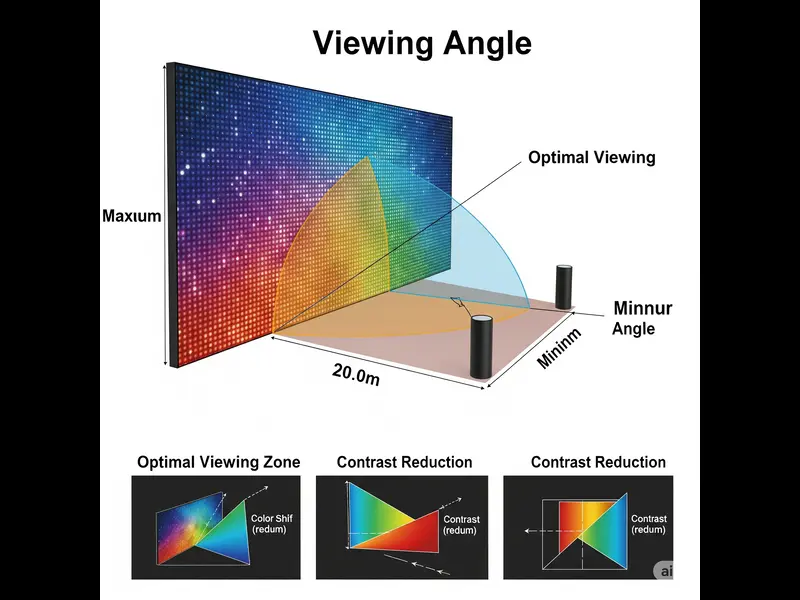
What Viewing Angles Actually Mean (Without the Marketing Fluff)
Let’s cut through the technical jargon and get to what actually matters for your viewing experience.
- Viewing angles determine how much your picture quality degrades when you’re not sitting directly in front of the screen.
- This isn’t some minor issue—we’re talking colors shifting, contrast disappearing, and brightness dropping significantly.
- Understanding this simple concept will save you from buyer’s remorse and help you set up your room correctly.
The Plain Truth About Picture Degradation
• Color Accuracy Goes Out the Window
Colors don’t just get less vibrant—they actually change hue when viewed from an angle.
That rich red becomes pink, deep blue turns pale, and skin tones look unnatural.
The further off-center you sit, the more dramatic these color shifts become.
• Contrast Basically Disappears forLED screen viewing angles
The difference between your brightest whites and darkest blacks collapses at an angle.
What looks like a punchy, dynamic image head-on becomes flat and washed out from the side.
This contrast loss is often more noticeable and annoying than the color shift.
• Brightness Takes a Nosedive for LED screen viewing angles
Screens appear significantly dimmer when viewed from off-center positions.
In a bright room, this can make content practically unwatchable from side angles.
You’re literally not seeing the full brightness you paid for.
• Black Levels Become Gray for LED screen viewing angles
This is the most frustrating part for movie watching—blacks don’t stay black.
What should be inky black shadows turn into milky gray messes from an angle.
This single issue destroys the cinematic experience for anyone not sitting dead center.
• Details Get Lost in Shadows for LED screen viewing angles
Shadow details that are clear when viewed head-on disappear at angles.
You miss facial expressions in dark scenes and details in shadowy areas.
It’s like part of the picture information just vanishes.
• Screen Uniformity Issues Multiply for LED screen viewing angles
Even minor backlight uniformity issues become magnified at an angle.
Clouding and flashlighting that’s barely noticeable head-on becomes obvious from the side.
What looks like a uniform screen from the front can look patchy and inconsistent from an angle.
• Text Becomes Hard to Read for LED screen viewing angles
If you use your TV for computing or reading text, it becomes challenging at angles.
Small text and user interface elements lose clarity and sharpness.
This matters for gaming HUDs, subtitles, or any on-screen information.
• The “Sweet Spot” is Real for LED screen viewing angles
There’s a limited area where the picture looks as the manufacturer intended.
Outside this cone, you’re getting a compromised version of what you paid for.
Most people dramatically overestimate how wide this sweet spot actually is.
• It’s a Physical Limitation for LED screen viewing angles
This isn’t a software issue or something you can “update” to fix.
It’s a fundamental limitation of how LED/LCD technology works.
Understanding this helps you set realistic expectations.
• Manufacturers Downplay It for LED screen viewing angles
Most specs sheets bury viewing angle performance or use misleading measurements.
That “178-degree viewing angle” claim is often technically true but practically useless.
The real-world performance is usually much worse than the marketing suggests.
The Real Difference Between IPS and VA Panels
You need to understand this fundamental choice because it determines everything about your viewing experience.
- IPS and VA represent a direct trade-off between viewing angles and contrast ratio.
- You literally cannot have the best of both worlds with current LED technology.
- Your panel type determines whether wide seating or dark room performance is better.
The Straight Talk on Panel Technologies
• IPS Panels: Better Angles, Worse Blacks
IPS panels maintain much better color and contrast at wide viewing angles.
The downside is they have inherently worse native contrast ratio, meaning poorer blacks.
If you have wide seating, IPS is usually the better choice despite the black level compromise.
• VA Panels: Great Contrast, Terrible Angles
VA panels offer significantly better contrast ratio with deeper blacks when viewed head-on.
The trade-off is that viewing angles are terrible—picture quality degrades rapidly off-center.
If you mostly watch alone or have very controlled seating, VA might work despite the angle limitations.
• The Contrast Ratio Trade-Off is Real
VA panels typically offer 3000:1 to 5000:1 native contrast ratio.
IPS panels usually range from 1000:1 to 1500:1 native contrast.
This isn’t a small difference—it’s immediately noticeable in dark room viewing.
• Color Consistency Matters More Than You Think
IPS panels maintain color accuracy much better across different viewing positions.
VA panels show significant color desaturation and shift even at moderate angles.
For group viewing, color consistency is often more important than maximum contrast.
• Response Time Differences for LED screen viewing angles
VA panels traditionally had slower response times, causing more motion blur.
Modern VA panels have largely closed this gap, but IPS still generally has better motion.
For fast-paced gaming or sports, this can be a consideration alongside viewing angles.
• Gaming Considerations for LED screen viewing angles
If you game alone in a dark room, VA’s contrast advantage might be worth the angle limitation.
For group gaming or brighter rooms, IPS’s viewing angles might be the better choice.
There’s no right answer—it depends on your specific use case.
• Price and Availability Reality
IPS panels are typically more expensive to manufacture than VA panels.
You’ll find VA panels dominating the budget and mid-range TV market.
IPS is more common in computer monitors where viewing angles matter more.
• The Professional Choice
For color-critical work or any situation requiring accuracy, IPS is the clear winner.
The consistent color across different viewing positions is non-negotiable for professionals.
VA’s contrast advantage doesn’t matter if the colors are wrong.
• Hybrid Technologies Exist But Have Compromises
Some manufacturers try to bridge the gap with various enhancements.
These usually involve trade-offs in cost, response time, or other areas.
Nothing currently matches IPS for viewing angles or VA for contrast in their respective strengths.
• Make Your Choice Based on Your Room
If you have wide seating, choose IPS and accept the contrast limitation.
If you have controlled seating and want the best dark room performance, choose VA.
There’s no magic solution—just pick the compromise that works for your situation.
How to Actually Test Viewing Angles Before Buying
Forget the technical specifications—here’s how to really know what you’re getting.
- Manufacturer specs are often misleading or measured under ideal conditions.
- Real-world testing gives you the truth about how a TV will perform in your living room.
- These simple tests work in any store and take less than five minutes.
Practical Store Testing Methods
• Do the Sidewalk Test
Stand directly in front of the TV, then walk sideways while keeping your eyes on the screen.
Notice how far you get before the picture becomes unacceptable to you.
The further you can walk before noticing major degradation, the better the viewing angles.
• Check Black Levels from an Angle
Find a dark scene or black test pattern on the display.
Look at it head-on, then move to about 45 degrees off-center.
Watch how much the black levels elevate—good displays maintain deeper blacks at angles.
• Compare Color Consistency
Find a display showing skin tones or bright colors like red and blue.
View these colors from the center, then from the side at about 45 degrees.
Good viewing angles show minimal color shift or desaturation.
• Test with Actual Content
Don’t just rely on test patterns—watch real movie scenes from different angles.
Look for loss of shadow detail in dark scenes and color shifts in bright scenes.
Real content often reveals issues that test patterns might hide.
• Compare Multiple Models Side-by-Side
If the store has multiple TVs showing the same content, compare them from angles.
The differences become immediately obvious when you see them together.
This is the fastest way to understand what “good” viewing angles look like.
• Check Both Horizontal and Vertical Angles
Most people only test side-to-side, but vertical angles matter too.
If you mount your TV high or low, check how the picture looks from those angles.
Many TVs have different performance horizontally versus vertically.
• Bring Your Content
If possible, bring a USB drive with content you actually watch.
Familiar content helps you spot degradation more easily than store demo loops.
You’ll immediately notice if your favorite movie looks wrong from an angle.
• Test in Similar Lighting Conditions
Store lighting is usually bright, which can mask some viewing angle issues.
Try to find a darker area or imagine how it would look in your home.
Viewing angle problems are often worse in dark room viewing.
• Ignore the Sales Pitch
Salespeople often downplay viewing angle limitations.
Trust what you see with your own eyes, not what you’re told.
Your personal tolerance for degradation is what matters.
• Check the Return Policy
If you’re unsure, buy from a retailer with a good return policy.
Test the TV in your actual viewing environment for a few days.
Sometimes home testing reveals issues you missed in the store.
Simple Fixes for Bad Viewing Angles
You might already own a TV with poor viewing angles—here’s how to make the best of it.
- Some simple adjustments can significantly improve the situation without buying new equipment.
- Most people never try these basic fixes that cost nothing but can make a big difference.
- You can’t completely overcome the technology’s limitations, but you can work around them.
Practical Workarounds That Actually Work
• Adjust Your Seating Arrangement
Arrange seating in a gentle arc focused on the TV rather than straight lines.
This ensures most viewers are within acceptable viewing angles.
Even moving chairs a few feet can make a noticeable difference.
• Increase Your Viewing Distance
Sitting further back reduces the angular difference for off-center seats.
The same physical displacement creates a smaller angular difference from greater distance.
This simple change can make marginal viewing angles become acceptable.
• Raise the Backlight Setting
Increasing backlight brightness helps compensate for brightness loss at wider angles.
This ensures off-center viewers still get adequate brightness for good visibility.
Just don’t set it so high that it causes eye strain for head-on viewers.
• Use Bias Lighting
Adding LED strips behind your TV improves perceived contrast for all viewing positions.
This helps mitigate the contrast loss that happens at wider angles.
It’s a cheap, effective solution that works surprisingly well.
• Adjust Picture Settings for Compromise
You might slightly oversaturate colors to compensate for desaturation at wider angles.
Increase contrast slightly to maintain image “punch” across different seats.
These are compromises, but they can improve the experience for side viewers.
• Choose the Right Picture Mode
Some picture modes degrade more gracefully at angles than others.
“Movie” or “Cinema” modes often maintain better color accuracy at angles.
Avoid “Vivid” modes that can show more dramatic color shifts.
• Control Room Lighting
Reduce ambient light that exacerbates viewing angle issues.
Use curtains or blinds to control sunlight during daytime viewing.
Proper lighting control makes viewing angle limitations less noticeable.
• Consider a TV Swivel Mount
If your TV is wall-mounted, a swivel mount lets you angle it toward different seating areas.
You can adjust the angle based on where people are sitting.
This simple mechanical solution can solve many viewing angle problems.
• Clean Your Screen
Dust and fingerprints can scatter light and make viewing angle issues worse.
A clean screen ensures optimal light transmission at all angles.
This basic maintenance is often overlooked.
• Accept the Limitations
Sometimes the best solution is managing expectations.
Understand that LED technology has inherent limitations with viewing angles.
Not every seat can have the perfect picture, and that’s okay.
When to Consider Upgrading Your TV
Sometimes the only real solution is getting a TV with better viewing angle technology.
- If you’ve tried all the workarounds and still have problems, it might be time for an upgrade.
- Newer technologies have significantly improved viewing angle performance.
- Knowing what to look for ensures you don’t make the same mistake twice.
Upgrade Considerations That Matter
• OLED Solves the Problem Completely
OLED TVs have essentially perfect viewing angles with no degradation.
Colors, contrast, and brightness remain consistent even at extreme angles.
If viewing angles are your primary concern, OLED is the definitive solution.
• High-End LED with Viewing Angle Enhancements
Some premium LED TVs use advanced films and panel structures to improve viewing angles.
These won’t match OLED but can be significantly better than budget models.
Look for specific viewing angle technologies in the specifications.
• QLED and Quantum Dot Improvements
Modern QLED TVs often have better viewing angles than standard LED TVs.
Quantum dot enhancement can help maintain color saturation at wider angles.
They still can’t match OLED but represent an improvement over basic LED.
• Size and Placement Considerations
Larger screens make viewing angle limitations more noticeable.
If you’re upgrading to a larger screen, viewing angles become more important.
Consider this when deciding between size and performance.
• Your Viewing Habits Have Changed
Maybe you’ve moved to a different room layout or have more people watching.
Your old TV might have been fine for your previous situation but doesn’t work now.
Be honest about how you actually use your TV now versus when you bought it.
• Cost Versus Benefit Analysis
OLED TVs cost significantly more than LED TVs with similar specifications.
Decide if the viewing angle improvement is worth the price difference for your situation.
For some people, it’s absolutely worth it—for others, the workarounds are sufficient.
• Future-Proofing Considerations
Viewing angle technology continues to improve with each generation.
Even if you don’t need perfect angles now, your next TV should have decent performance.
This is one of those quality-of-life improvements you’ll appreciate over time.
• The Multi-Viewer Household
If multiple people regularly watch from different positions, good viewing angles are essential.
The frustration of compromised picture quality adds up over time.
In this case, investing in better viewing angles is usually worth it.
• Gaming and Sports Viewing
If you host game nights or sports viewing parties, consistent picture quality matters.
You don’t want arguments about who gets the “good seats.”
This social aspect might justify the upgrade cost.
• Trust Your Eyes
If you see a TV with noticeably better viewing angles and it fits your budget, consider it.
Sometimes the improvement is dramatic enough to justify the cost immediately.
Don’t overthink it—if it looks significantly better to you, it probably is.
The Bottom Line on LED Viewing Angles
Let’s be completely honest about what you can realistically expect.
- LED technology has inherent viewing angle limitations that can’t be completely overcome.
- Understanding these limitations helps you make better buying decisions and setup choices.
- The goal isn’t perfection—it’s finding the right balance for your specific situation.
The Plain Truth About Real-World Performance
• Manufacturer Claims Are Optimistic
That “178-degree viewing angle” specification is technically true but practically meaningless.
The picture is usually unwatchable long before you reach those extreme angles.
Real-world usable viewing angles are typically much narrower.
• There’s No Magic Solution
No setting or adjustment can completely fix fundamental technology limitations.
All the solutions I’ve mentioned are workarounds, not fixes.
Understanding this prevents wasted time and frustration.
• Your Room Determines Everything
The same TV can be perfect in one room and terrible in another.
It’s all about matching the technology to your specific room layout and seating.
There’s no universally “best” TV—only what works for your situation.
• Cost Versus Performance is Real
Better viewing angle technology usually costs more money.
You need to decide how much this feature is worth to you personally.
For some people, it’s worth paying extra—for others, it’s not.
• OLED is the Only True Solution
If perfect viewing angles are essential to you, OLED is the only current technology that delivers.
Everything else involves some level of compromise.
This is the simple, undeniable truth.
• Most People Adapt
Humans are remarkably adaptable when it comes to visual perception.
Many people live with mediocre viewing angles without even realizing it.
Once you see the difference, though, it’s hard to unsee it.
• Future Technology Looks Promising
New display technologies in development may eventually solve this problem for LED TVs.
For now, we work with what’s available and affordable.
The situation is slowly improving with each generation.
• Focus on What Matters to You
Don’t get obsessed with specifications that don’t affect your actual viewing experience.
If you’re happy with what you see from your normal seating positions, that’s what matters.
Technical perfection is less important than practical satisfaction.
• The Best TV is the One You Enjoy Watching
All this technical discussion can make you forget why we buy TVs in the first place.
The goal is enjoyment, not technical perfection.
If you’re happy with your TV, that’s ultimately what counts.
• Knowledge Prevents Disappointment
Understanding viewing angles helps you set realistic expectations.
You won’t be disappointed by limitations you understood before buying.
This knowledge is power when shopping for your next TV.
Advanced Optical Coatings – LED Screen Viewing Angles
| Coating Type | Reflectance | Haze | Color Accuracy | Best Use |
| Glossy | 4-8% | 0% | Excellent | Dark rooms |
| Matte AG | 1.5-2% | 15% | Good | Offices |
| Nano-Texture | 0.2% | 5% | Excellent | Apple Pro Display XDR |
| AR Glass | 0.4% | 1% | Perfect | Samsung Outdoor Signage |
Panel Technology Face-Off
| Technology | 0° Contrast | 45° Contrast | ΔE at 45° | Best Use Case |
| TN Film | 1000:1 | 50:1 | >12 | Budget gaming |
| VA Panel | 3000:1 | 400:1 | 4-6 | Home theater |
| IPS/PLS | 1100:1 | 550:1 | 2-3 | Design studios |
| OLED | Infinite | Infinite | <1 | Critical viewing |
| MicroLED | Infinite | Infinite | <0.5 | Future displays |
Conclusion
LED screen viewing angles are not a minor technical detail; they are the defining factor between a good investment and a wasted one. By understanding the science, respecting the geometry of your space, and prioritizing wide-angle technologies like Direct View LED, you guarantee that your message, content, and brand are experienced with stunning clarity by every single person in the room. This transforms a simple display into a powerful and inclusive tool for communication and engagement.
FAQs with Simple Answers
For most indoor applications like conference rooms and lobbies, a viewing angle of 160 degrees is excellent. This ensures clarity for almost everyone in a typical wide room. For very wide spaces or critical color work, look for 170 degrees or more.
This is called color shift. It happens because the path of light from the red, green, and blue LEDs to your eye changes at an angle. Some colors can get blocked or appear dimmer than others, making the overall color mix inaccurate.
No. While Direct View LED screens are generally excellent, older or very cheap models may not be. LCD displays (which use an LED backlight) have significantly worse viewing angles. Always check the spec sheet before buying.
Unfortunately, no. The viewing angle is a fixed property of the LED modules and lenses. You cannot upgrade or change it after installation. Your only options are to reposition the screen or the audience.
Brightness (nits) is how much light the screen emits. Viewing angle is how that light is distributed. A very bright screen with a narrow angle will only look bright to people directly in front of it.
For the vast majority of applications, yes. The only potential downside is a slight reduction in peak head-on brightness, as the light is being spread over a wider area instead of focused forward.
The first number is the horizontal viewing angle (left to right), and the second is the vertical viewing angle (up and down). A symmetrical rating like this is ideal for most setups.
Your phone and laptop use LCD technology with a backlight. The liquid crystals themselves block light at angles. A Direct View LED wall has millions of individual light bulbs (LEDs) pointing directly at you, which is naturally better at wide angles.
Not directly. The viewing angle is determined by the design of the LED package and the lens on top of it. A screen with a small pixel pitch can have either a good or bad viewing angle, depending on its build quality.
It’s less critical for displays that will only ever be viewed straight-on by a single person, like a specialized medical monitor or a screen in a kiosk that forces the user to stand directly in front of it.




- Be Respectful
- Stay Relevant
- Stay Positive
- True Feedback
- Encourage Discussion
- Avoid Spamming
- No Fake News
- Don't Copy-Paste
- No Personal Attacks
- Be Respectful
- Stay Relevant
- Stay Positive
- True Feedback
- Encourage Discussion
- Avoid Spamming
- No Fake News
- Don't Copy-Paste
- No Personal Attacks
